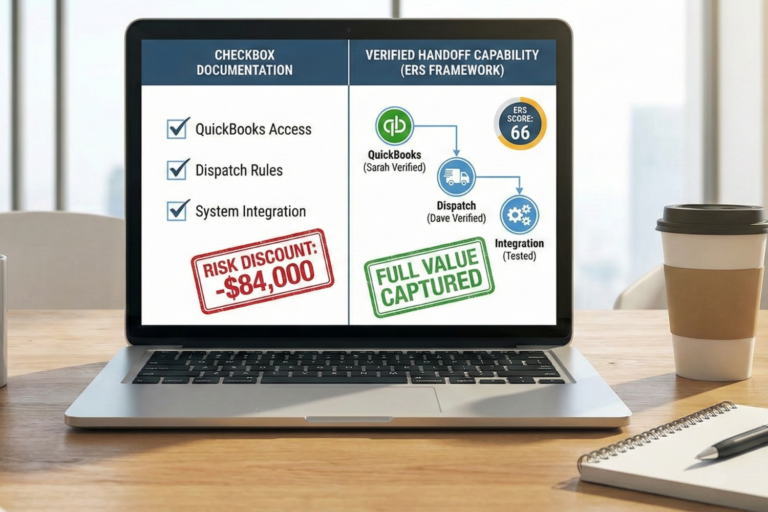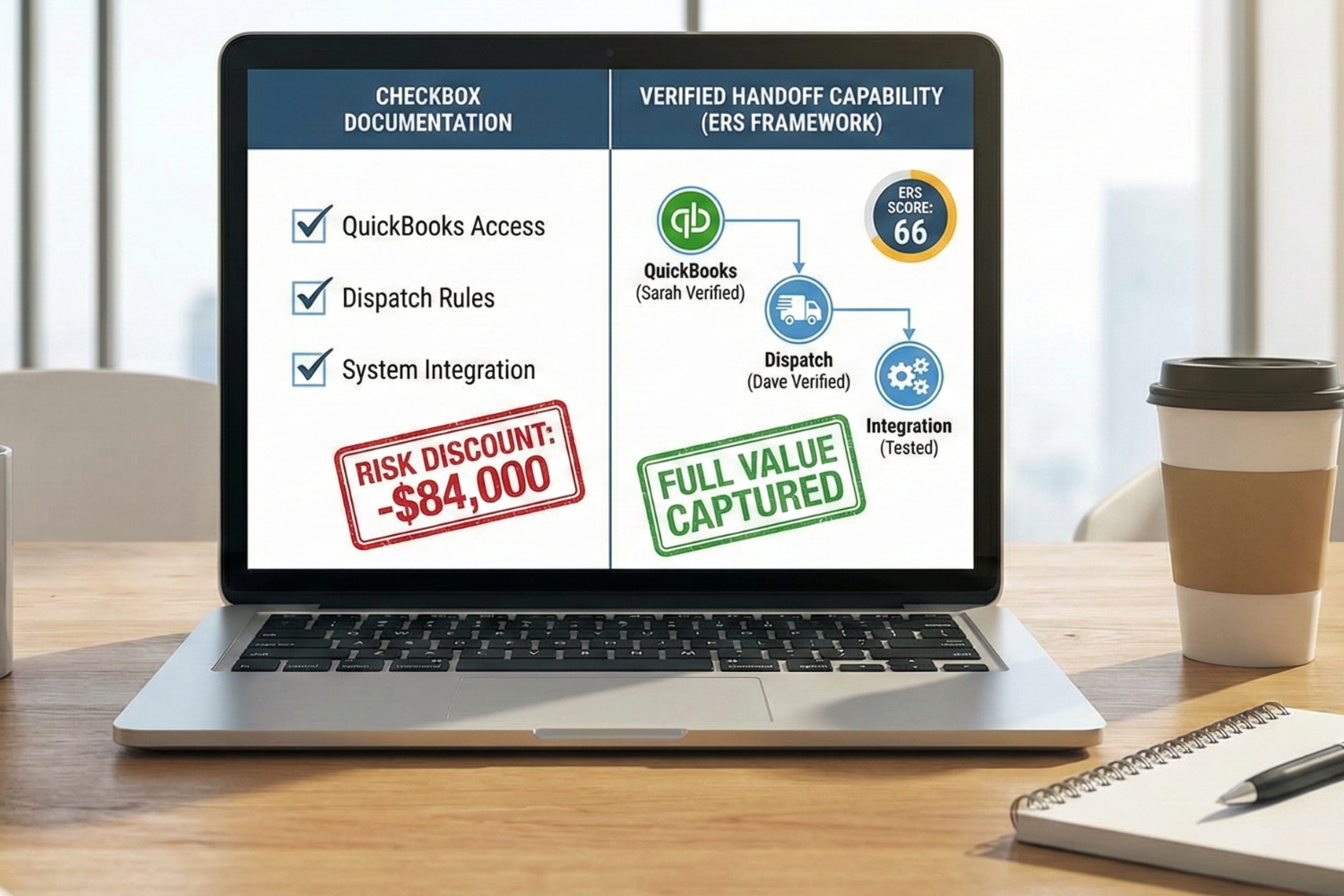
Your business system handoff looks complete on paper, but buyers will prove otherwise in 48 hours. Tom from Comfort Zone HVAC learned this the hard way. He scored his technology systems a 3 out of 5 because ServiceTitan and QuickBooks both worked fine. During due diligence, buyers asked a different question: Can anyone besides Tom run them?
The answer was no. Sarah had passwords written down, but couldn’t close the month in QuickBooks. Dave could schedule jobs, but didn’t know how to modify dispatch rules. Nobody understood the integration between systems. That gap cost Tom $84,000 in valuation when buyers applied a risk discount to his multiple.
You can avoid this using the same framework from the Exit Readiness Score (ERS) that helped Tom improve from 46 to 66. The difference between checkbox documentation and verified handoff capability determines whether you capture full value or leave money on the table when the deal closes.
Why System Handoff Readiness Matters for Business Value
Business system handoff readiness directly affects what buyers pay for your company. Strong handoff preparation protects your valuation multiple and helps you survive due diligence without delays. The handoff process reveals whether your business can operate without you, which matters more than most owners realize.
The Documentation vs. Capability Gap
Documentation proves you wrote something down, but capability proves someone else can do the job. Tom had QuickBooks passwords in a notebook. Sarah could open the file. The problem appeared when buyers asked her to run reports during due diligence.
Sarah couldn’t process payroll or reconcile accounts. The credentials existed, but operational capability didn’t. This gap matters because buyers purchase your ability to generate revenue after you leave. A workflow system that only you can operate creates a dependency that triggers valuation discounts.
What Buyers Actually Test During Due Diligence
Buyers verify transferability through live testing, not document review. They ask your backup administrator to perform real admin tasks. Can this person close the month? Do they know how to reset permissions? Have they exported customer data?
The project handoff process reveals gaps in documentation. Tom’s buyers requested that Sarah demonstrate three scenarios: processing a refund, adjusting an invoice, and running a custom report. She couldn’t complete these tasks without calling Tom. The business depended on him, not on documented systems.
Buyers also contact vendors directly. They call the account manager in your documentation. If that person left two years ago, your escalation paths don’t work. These handoff failures signal bigger operational problems.
How Does Incomplete Handoff Preparation Affect Your Multiple?
Incomplete handoff preparation reduces your valuation through risk discounts. A business generating $400,000 in earnings might warrant a 3.0x multiple with strong handoff readiness. Messy handoffs drop that to 2.8x or lower. The math is direct: 0.2x times $400,000 equals $80,000 in lost value.
Personnel changes create operational risk. If the business can’t function during transition, cash flow drops, and customer satisfaction suffers. Strong handoff preparation works in reverse. Clear ownership of systems and trained backup administrators reduces risk and support premium multiples.

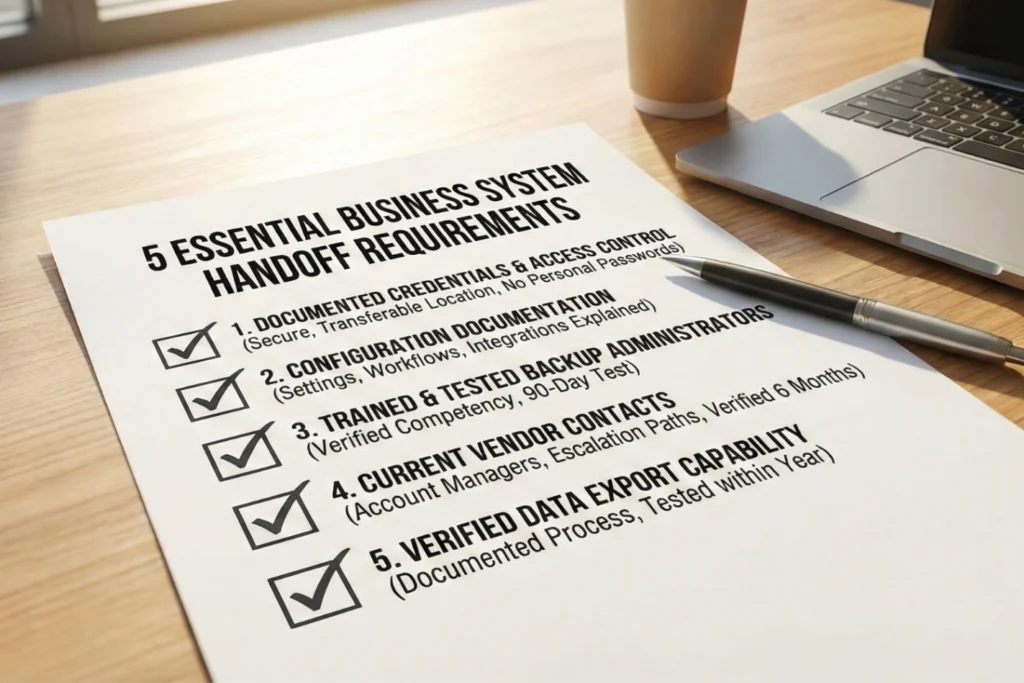
The 5 Essential Requirements for Every Business System
Every critical business system needs five verified components before it transfers cleanly to new ownership. These requirements form the foundation of any successful project handover.
Documented Credentials and Access Control
Login information, passwords, security questions, and two-factor authentication must live in a secure, transferable location. Not your personal password manager. Buyers need immediate system access after closing without waiting for password resets or dealing with codes sent to their personal phone.
Configuration Documentation That Transfers Knowledge
System settings, custom fields, workflow automation rules, and integration connections need written explanations. Someone must understand why QuickBooks connects to your bank using specific routing rules. Why does ServiceTitan send automated texts only to commercial customers? Configuration documentation turns invisible knowledge into transferable assets.
Trained and Tested Backup Administrators
A second person must successfully log in, perform administrative tasks, and demonstrate competency within the past 90 days. Sarah needs to prove she can close the month in QuickBooks, not just confirm she has the password. Theoretical access means nothing without verified capability.
Current Vendor Contacts and Escalation Paths
Account manager names, phone numbers, email addresses, and support escalation paths must be verified within six months. When your accounting software crashes during tax season, the new owner needs to know exactly who to call for priority support. Outdated contacts create information gaps that fail due diligence.
Verified Data Export Capability
A tested and documented process for extracting all business data must exist. This includes file formats, export procedures, and data retention policies executed within the past year. Buyers want proof they can get customer records and financial history out of systems if needed.
How Buyers Test System Handoff During Due Diligence
Buyers verify system transferability through hands-on testing during late-stage due diligence. The project team conducts four standard tests that expose gaps between documentation and reality.
Backup Administrator Login Verification
Buyers watch your backup administrator log into critical systems and perform real tasks. Can Sarah access both QuickBooks and ServiceTitan without help? Does she know where to find key reports? Can she complete routine operations without documentation?
Tom discovered Sarah had never logged into ServiceTitan because he always handled scheduling. She had credentials but didn’t know how to use the dispatch board. The gap became obvious when buyers asked her to reschedule a job.
Vendor Contact Responsiveness Checks
Buyers call vendor contacts in your documentation to verify relationships are current. They reach out using phone numbers and email addresses you provided. Do contacts answer? Are they the right people? Do they know your account details?
This test catches outdated information. Tom’s parts supplier contact had retired 18 months ago. When buyers called, they reached general customer service with no record of Tom’s negotiated payment terms. The relationship existed only in Tom’s personal network.
Live Configuration Documentation Review
Buyers compare written configuration documentation against production systems. They open QuickBooks and check whether the chart of accounts matches documentation. They review ServiceTitan settings to verify that workflow rules do what the documentation claims.
Tom had automated invoicing six months ago, but never updated procedures. Documentation described manual invoice creation. Buyers couldn’t reconcile documentation with reality. Configuration drift happens when you change systems but don’t update documentation.
What Happens During Data Export Trial Runs?
Buyers request live demonstrations of data export procedures. They ask you to export customer records and financial transactions using documented processes. Does the export function work? Does it include the necessary fields? Can you explain the file format?
Tom had never actually used the QuickBooks export function. When buyers requested a customer list with purchase history, he had to figure out the export process during due diligence. The exported data had 40 percent missing phone numbers. Clean data matters for smooth transitions.

The System Handoff Readiness Scoring Framework
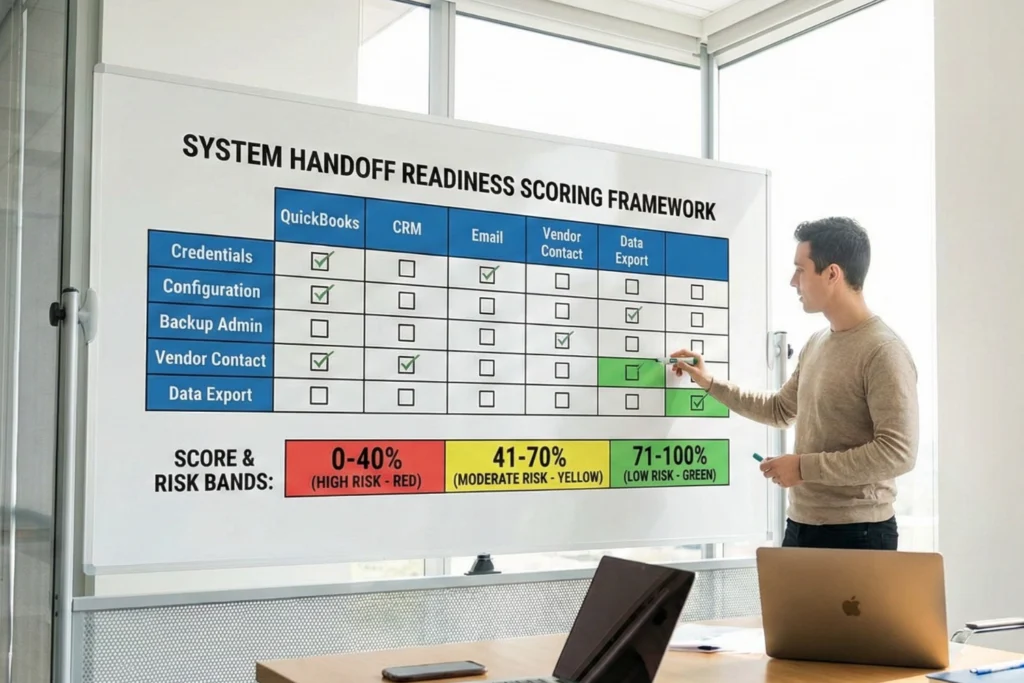
The handoff readiness scoring framework measures business systems on a scale from 0 to 100 using three risk bands. You score each system separately, then calculate the overall completion percentage.
How to Score Your Business Systems
Score each business system across five requirements using simple completion checks. For every system (QuickBooks, CRM, email, website hosting, and inventory management), mark whether each requirement is complete. Are credentials documented? Is the configuration documented? Has your backup administrator been tested in 90 days?
Each completed requirement earns 20 points per system. A system with all five requirements scores 100 percent. Three requirements score 60 percent. Only credentials documented scores 20 percent.
Tom assessed five critical systems. QuickBooks had credentials and vendor contacts, but no tested backup administrator or export process. That scored 40 percent. ServiceTitan scored 20 percent with only credentials. His overall completion: 32 percent.
Understanding the Three Risk Bands (0-40%, 41-70%, 71-100%)
Completion percentages fall into three risk bands. Systems scoring 0 to 40 percent create a high risk with major operational disruption likely. Systems scoring 41 to 70 percent show moderate risk with functional capability but gaps. Systems scoring 71 to 100 percent demonstrate low risk with strong transferability.
High-risk systems require immediate remediation before sale. Buyers won’t close when critical systems can’t transfer. Moderate risk systems need improvement, but don’t kill deals. Low-risk systems prove the business can operate without the current owner.
What Your Score Means for Valuation
Your handoff readiness score directly affects buyer multiples. Scores above 71 percent protect your base multiple with limited transfer risk. Scores between 41 and 70 percent trigger moderate discounts of 0.1 to 0.2x. Scores below 41 percent create major discounts of 0.2 to 0.5x or prevent sales entirely.
Tom’s improvement from 32 percent to 76 percent eliminated the 0.2x discount and recovered his full 3.0x base multiple. The score increase proved his business could survive an ownership transition.
Common System Handoff Gaps That Fail Due Diligence
Five gaps appear repeatedly during due diligence and create immediate red flags:
- Outdated Vendor Contacts: Account manager who left two years ago still listed as primary contact. Support phone numbers reach the wrong departments. Email addresses bounce. Buyers discover relationships you described don’t exist anymore.
- Untested Backup Administrator Access: Sarah has the QuickBooks password written down but hasn’t logged in since 2022. Credentials work, but she doesn’t know which reports to run. Buyers realize theoretical access doesn’t equal operational capability.
- Configuration Documentation Mismatches: Written procedures describe the old workflow before you automated invoicing. Custom fields added last year aren’t explained. Integration connections work, but nobody knows what data they sync.
- Personal Email Controlling Systems: Domain registered to your Gmail account. Software licenses tied to your personal address. Password reset emails go to the inbox; buyers can’t access them after closing.
- Never-Executed Data Export: Export function exists in theory, but you’ve never used it. Exported data is missing critical fields. No documentation of what gets exported or where it goes.
Moving from Documentation to Verified Capability
Verified capability requires testing systems regularly under real conditions. Repeatable systems convert documentation into demonstrated competence across your organization.
Quarterly Backup Administrator Drills
Schedule quarterly drills where your backup administrator performs critical tasks without help. Set aside two hours every three months for Sarah to close the month, run reports, and process payroll. You observe but don’t intervene.
Drills reveal capability gaps before buyers discover them. Sarah might run basic reports, but struggles with cash flow statements. You identify gaps during drills and provide training. Next quarter confirms she learned the process.
Maintaining Current Vendor Relationship Logs
Update vendor contact documentation every six months with current names, phone numbers, and verified emails. Call each key vendor to confirm they’re still responsible for your account and that escalation paths work.
Regular verification prevents contacts from going stale. Tom’s parts supplier contact retired 18 months before due diligence. Regular verification would have caught this change when it happened.
Running Data Export Dry Runs
Run data export procedures annually to verify you can extract complete, accurate business data. Export customer records and financial transactions using documented processes. Review files to confirm they include necessary fields and meet quality standards.
Annual exports expose problems before buyers request demonstrations. Tom discovered incomplete contact information only after buyers asked for exports. Annual dry runs would have revealed data quality issues when he still had time to fix them.
Building Your System Handoff Checklist
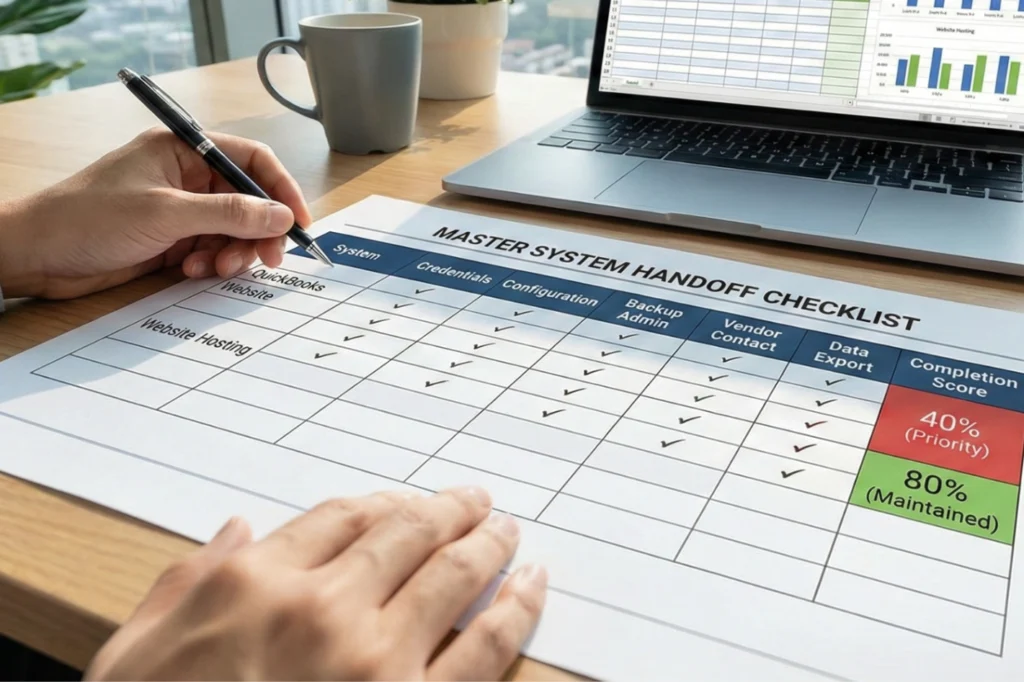
Create a master handoff checklist tracking completion status for all five requirements across every critical system. The checklist shows which systems are transfer-ready and which have gaps. Update it quarterly after drills and verification calls.
Tom used his checklist to prioritize improvement work. QuickBooks scored 40 percent and went to the top of the schedule. His website hosting scored 80 percent and stayed maintained while he focused on bigger gaps.
System Handoff Readiness Timeline for Exit Planning
System handoff preparation works best when started three to five years before the planned exit. The timeline gives space to build capability gradually while maintaining normal operations.
Years 3-5 Before Exit: Foundation Building
Start by identifying critical business systems and documenting basic credentials. List every system the business depends on: accounting software, customer management, email platforms, payment processing, and scheduling tools.
Document current login credentials in secure, transferable locations. Record usernames, passwords, security questions, and two-factor authentication methods. Begin training a backup administrator on your most critical system, typically accounting software.
Years 1-2 Before Exit: Verification and Testing
Implement quarterly backup administrator drills to verify that trained team members can operate systems independently. Schedule the first drill six months after initial training begins. Have Sarah close the month in QuickBooks without assistance while you observe.
Document configuration settings for each critical system during this period. Write down how your chart of accounts is structured, which automation rules control invoicing, and how bank feeds are configured.
Months 6-12 Before Exit: Buyer-Ready Documentation
Execute your first complete data export from each critical system. Export your full customer list from CRM. Extract all financial transactions from QuickBooks. Pull service history from scheduling systems. Review each export to confirm data quality.
Complete your system handoff checklist showing the current status of all requirements across every system. Calculate overall completion percentage. If you score below 71 percent, identify which systems need work and schedule time to close gaps.

Start Building Verified Handoff Capability Today
System handoff readiness separates businesses that sell from those that stay on the market without offers. The difference between having QuickBooks credentials documented and having a backup administrator who closed last month’s books determines whether buyers see a transferable business or an owner-dependent job. One supports a 3.0x multiple, the other triggers a 2.8x discount.
Start with your most critical system today. Document credentials in a secure location that your backup administrator can access. Write down configuration settings. Schedule training where you teach someone to perform basic admin tasks. Contact your vendor to verify the account manager information. Run a data export to prove you can extract business information.
The Exit Readiness Score framework in “Documenting Your Business So It Can Survive You” provides a complete assessment methodology, but verified handoff capability starts with one system, five requirements, and proof that someone besides you can keep the business running.
Frequently Asked Questions
How many business systems should I include in my handoff assessment?
Focus on the 5 to 8 critical systems your business needs to operate daily (accounting, CRM, email, payment processing), not every software tool you occasionally use.
What counts as a “critical” business system?
A critical system would cause revenue loss or customer satisfaction problems within 48 hours if it became inaccessible during the ownership transition.
How long does it take to reach 71% handoff readiness?
Most businesses starting below 40% completion reach 71% in 12 to 18 months with consistent effort of 3 to 5 hours weekly.
Can I use a password manager as my credential documentation?
Personal password managers don’t work because buyers can’t access your account after closing; use a business-grade password manager or secure document storage that transfers with the company.
What if my backup administrator leaves before I sell?
Train a replacement immediately and run quarterly verification drills to confirm the new backup administrator achieves the same competency level.
References
- Internal Revenue Service. (2026, February 10). Sale of a business. https://www.irs.gov/businesses/small-businesses-self-employed/sale-of-a-business
- National Institute of Standards and Technology. (2018, December). Risk management framework for information systems and organizations: A system life cycle approach for security and privacy (SP 800-37 Rev. 2). U.S. Department of Commerce. https://csrc.nist.gov/pubs/sp/800/37/r2/final
- Office of the Comptroller of the Currency. (2011, June 3). OCC Bulletin 2011-21: Advanced measurement approaches for operational risk: Interagency guidance on the advanced measurement approaches for operational risk. https://www.occ.gov/news-issuances/bulletins/2011/bulletin-2011-21.html
- Robinson, R. (2019, March 28). The due diligence and valuation process when buying a business. SCORE. https://www.score.org/resource/blog-post/due-diligence-and-valuation-process-when-buying-a-business
- U.S. Small Business Administration. (n.d.). Close or sell your business. https://www.sba.gov/business-guide/manage-your-business/close-or-sell-your-business