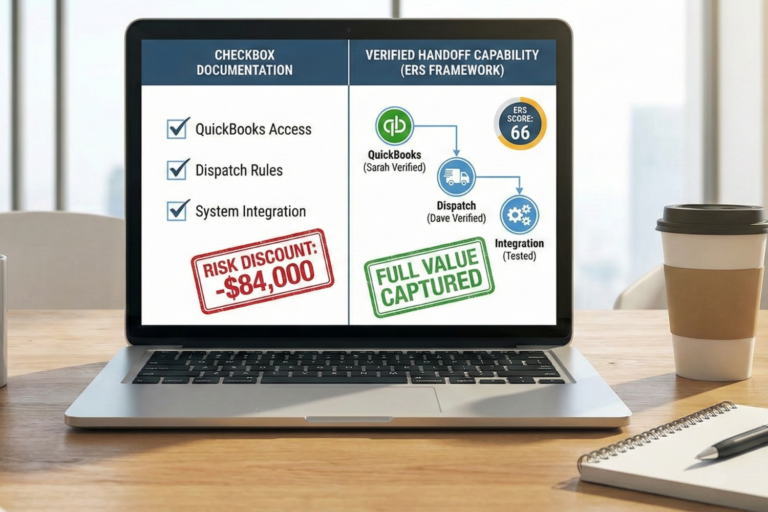
A technology system score of 3 out of 5 feels like passing, but in many cases, it is a trap. A moderate score typically means your systems work for day-to-day operations, but cannot transfer to a new owner without significant effort. During their evaluation, buyers will scrutinize every system your business depends on, which is why having a comprehensive technology due diligence checklist is critical. When they find accounts tied to your personal email, software only you can configure, or spreadsheets only you understand, they see immense risk. Ultimately, that perceived risk directly reduces your multiple (the number applied to your earnings to estimate sale price).
This is one of the most frustrating discoveries business owners make during the sale process. You built a business that runs well. The technology works. And then a buyer tells you that your perfectly functional systems are a problem. This article shows you exactly what buyers check, how a Score 3 compares to a Score 5, and what to fix first.
What Buyers Check: The 6 Technology Categories in Due Diligence
Buyers do not look at your technology and ask, “Does it work?” They ask, “Can someone else run it?” The distinction matters. Buyers evaluate your systems across these categories:
CRM (customer relationship management software) and operations platform (ServiceTitan, Jobber, Housecall Pro). Who has admin access? Is the configuration documented? Could a new owner change settings without calling the former owner?
Accounting system (QuickBooks, Xero). Is the account under a business email or a personal one? Are integrations documented?
Communication (email, phone). Are business communications on a domain you own, or running through a personal Gmail or cell phone?
File storage (Google Drive, Dropbox, OneDrive). Are permissions consistent? Can a new employee access what they need on day one?
Specialized tools (industry-specific software, custom spreadsheets). Are formulas documented? Could someone else modify them?
Access documentation. Is there a single document listing every system, every login, and every admin credential?
In the Exit Readiness Score framework, Factor A1.2 evaluates technology systems directly. It carries 20% of the Systems and Documentation score, which itself is 15% of the overall ERS. That makes technology systems 3% of your total exit readiness. That percentage is small, but technology failures create visible, memorable problems during due diligence.

The Score 3 Trap: Why Adequate Technology Is Not Transferable Technology
The Exit Readiness Score criteria for technology systems (Factor A1.2) define three levels:
| Score | Description | Buyer perception |
|---|---|---|
| 5 | Modern, cloud-based, access-controlled, clear system of record for each domain. | Minimal transfer risk. Buyer can operate on day one. |
| 3 | Mix of modern and legacy tools, workable but fragile. | Moderate transfer risk. Buyer likely needs several months of owner support. |
| 1 | Home-grown or person-dependent tools, no clear admin handoff. | High transfer risk. Buyer may walk away or demand significant price reduction. |
The trap is in Score 3. A business at Score 3 has technology that works. Employees use it daily. Revenue flows through it. But when a buyer asks, “Can I run this without you?” the answer at Score 3 is “not immediately.” That gap between functional and transferable is where buyers negotiate price reductions.
Sellers who address technology transfer risks before listing reduce buyer concerns during due diligence, which typically supports stronger offers.
Tom’s Technology Reality: A Case Study in Hidden Vulnerabilities
Tom owns an HVAC business. He scored 3 out of 5 on technology systems. At first glance, that looks adequate. His business runs. His customers get served. His invoices go out.
Here is what a buyer would find during due diligence:
ServiceTitan: Tom is the only admin. Five years of configuration (custom workflows, pricing rules, dispatch logic) exist only in Tom’s account. No documentation exists for any of it.
QuickBooks: Registered to Tom’s personal Gmail address. If Tom leaves, the business loses access to its own financial system unless the account is migrated.
Excel files: Tom built nested formulas for estimating jobs and tracking margins. Only Tom understands how the formulas work.
Gmail: Tom uses his personal email for business correspondence. Customer history, vendor negotiations, and employee communications all live in an account Tom owns personally.
Dropbox: Sharing permissions are inconsistent. Some folders are shared with the team, others are Tom’s personal files mixed with business documents.
Each of these is a specific, documentable transfer risk. Not one of them prevents Tom’s business from operating today. All of them prevent a buyer from operating it tomorrow without Tom.
Most owners discover these issues only when a buyer points them out. The goal is not perfection. It is knowing where you stand before someone else tells you.
Your Technology Transfer Scorecard: 5 Questions
Answer each question honestly. Every “no” represents a gap a buyer will find during due diligence.
| # | Question | Yes | No |
|---|---|---|---|
| 1 | Is every business system (CRM, accounting, email, file storage) registered to a business-owned account with a business email? | ||
| 2 | Does at least one other person besides you have admin access to every critical system? | ||
| 3 | Could a new employee find login credentials for every system your business uses in a single document? | ||
| 4 | If you were unavailable for 30 days, could your team access, use, and modify every system without calling you? | ||
| 5 | Are your custom spreadsheets, reports, or formulas documented well enough for someone else to update them? |
Score 4-5 (Strong): Your technology systems are transferable. A buyer can operate them without you. This earns full valuation credit for A1.2.
Score 2-3 (Moderate): Your systems work but are not fully transferable. Buyers will factor in several months of transition support and may reduce their offer.
Score 0-1 (Weak): Your technology systems are owner-dependent. Buyers see significant risk and will either demand substantial price concessions or walk away.
These bands correspond to the scoring levels in the Exit Readiness Score framework.
What to Fix First: The Three Changes with the Highest Impact
If you scored below 4, start with these three changes. Each is achievable within 30 days.
Move every business account to a business email address. If your QuickBooks, ServiceTitan, or any other system is registered to a personal email, create a business domain email (e.g., admin@yourbusiness.com) and migrate the account. This is the single highest-impact change because personal accounts create a hard dependency on you.
Add a second admin to every critical system. Identify your operations manager, bookkeeper, or most senior employee and add them as an admin to your CRM, accounting platform, and file storage. Document the process so the next admin addition takes minutes, not hours.
Create a one-page system inventory. List every technology system your business uses. For each, record: the system name, what it does, the login URL, the admin email, and who else has access. Store this document in your business file storage, not your personal files.
Your next step: Open a blank spreadsheet and list every technology system your business uses in the first column. For each one, write the email address it is registered to in the second column. If any of those email addresses are personal, that is your first fix.
The Exit Readiness Score evaluates 35 factors across systems, customers, financials, team, and owner readiness. Technology systems readiness is one of the factors within the Systems and Documentation subcategory.
Frequently Asked Questions
What is technology due diligence?
Technology due diligence is the part of a buyer’s investigation that examines whether your software, accounts, and systems can transfer to a new owner. Buyers are not asking whether your technology works; they are asking whether they can run it without you.
What do buyers look for in a business’s systems before buying?
They check who holds admin access, whether accounts are on business-owned emails, whether configurations and formulas are documented, and whether a single inventory of logins exists. The recurring theme is transferability, not day-to-day function.
Why does using a personal email for business accounts hurt a sale?
A personal email creates a hard dependency on you: if you leave, the business can lose access to its own financial or operational systems. Buyers treat this as a concrete transfer risk and may discount their offer or require migration before closing.
How do I prepare my business systems for sale?
Move every account to a business domain email, add a second admin to every critical system, and create a one-page inventory listing each system, its login, and who has access. These three steps are typically achievable within 30 days.
What is a system of record?
A system of record is the single, authoritative source for a given type of business data, such as accounting in QuickBooks or jobs in your CRM. Buyers want a clear system of record for each domain so there is no ambiguity about where the real data lives.
References
Bhandari, A., & McGrattan, E. R. (2021). Sweat equity in U.S. private business. The Quarterly Journal of Economics, 136(2), 727–781. https://doi.org/10.1093/qje/qjaa041
Ordower, H. (2011). United States of America: The burden of proof in tax matters. SSRN Electronic Journal. https://doi.org/10.2139/ssrn.1852347